Showing posts with label pad. Show all posts

Monday, November 11, 2013

How to Reset Epson rx650 waste ink pad counter


FIX PRINTER ERROR "parts inside printer end service life, waste ink pad counter overflow error"

1. Switch on printer
2. Set the pc date setting to 13 february 2007
3. Run adjprog.exe from the extracted folder
4. Click accept
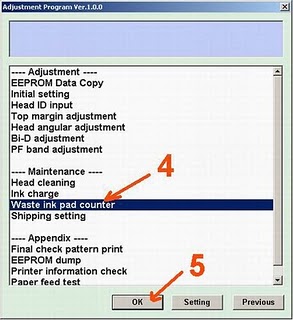
5. Click particular adjustment mode
6. Go to maintenance then Select waste ink pad counter then click ok
7. Click on "check button till its done then click on initialization button then click on finish button

8. Switch off printer for 5 secs then switch on again
9. After you reset succesfully, you can change the date back to normal

Resetter -  Download Here

Sunday, November 10, 2013

Reset for Epson T13 printer waste ink pad counter overflow error


Reset for Epson T13 printer waste ink pad counter overflow error

FIX PRINTER ERROR "parts inside printer end service life, waste ink pad counter overflow error" 

How to Reset Epson Stylus T13 :


Step 1:Be sure the driver of epson printer T13 must have been installed on your computer.
Step 2:Download Software resetter of Epson T13 first.You can download it here http://www.ziddu.com/download/12673537/T13byOrTHoTaMiNe.rar.html File Size : 398.91 KB
Note:Date of computers do not need to be changed as previously resetter.
     Turn off your Antivirus, because reseter T13 detected as virus by antivirus software.
Step 3:Run the downloaded program of Epson T13 with a double click on "AdjProg.exe".
Step 4:Follow the photo direction below(Ten Steps to do)


"Check: used to counter check the maximum 7800 points, you can see it in the main pad counter. 
If more or close to 7800 points means the printer needs to be reset " 
"Initialization: used to reset to zero counter printer "

When finished turn the printer off and then switch on again. 
The printer will flame with a full green light.That Means the printer Epson Stylus T13 that have been error is ready for use again.
enjoy.