Showing posts with label epson. Show all posts

Monday, July 6, 2015

Epson Stylus C60 Service guide get now


Epson Stylus C60 Service manual DOWNLOAD covers:

Inside you will found about General Information also Spec and Lube Points, Oil Types, Periodic Maintenance and Tune-Up Procedures, Engine Servicing, Disassembly, Reassembly, Engine Removal, Fuel and Lubrication Systems, Carb Rebuild, Carb Adjustments, Electrical System and manyn more inside the repair manual, Wiring Diagrams, Gearbox, Exhaust System, Suspension, Fault Finding, Cooling System, Detailed Specifications, Transmission, Factory Maintenance Schedules, Timing Chain Service, Exhaust Service, Abundant Illustrations, Lots of pictures & diagrams, Not only that still many more.


Service Repair manual found here forEpson Stylus C60 Service manual DOWNLOAD!!

Tuesday, November 26, 2013

Resetter Epson T and TX series Contain Trojan horse

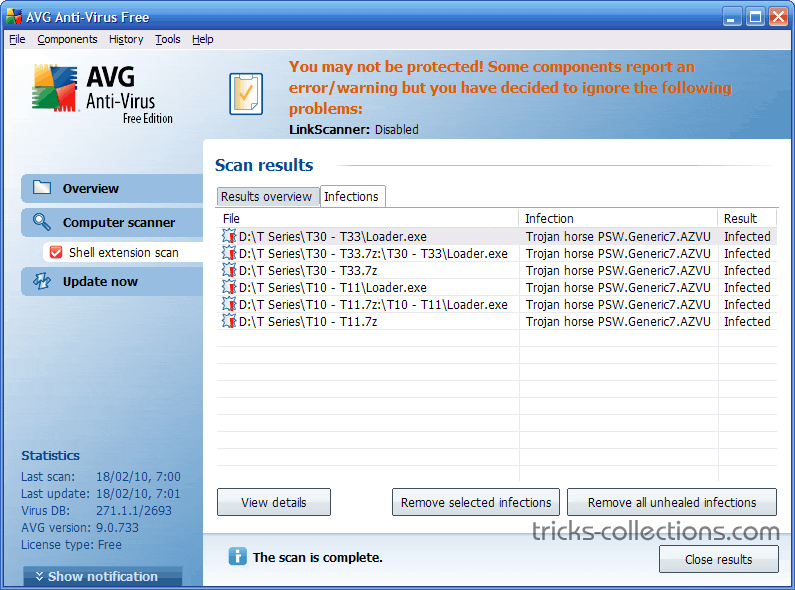
Loader.exe on Resetter Epson T and TX series Contain Trojan horse…??. Don’t worry if you are using or will use adjustment program Epson T and TX series. The possibility of this problem is caused the error code writing when OrTHoTaMiNe cracked this program. I know this problem when backing up data and program on my computer to DVD.
On my Computer I use AVG 9 free version with the latest update (February 18, 2010). Other antivirus software might not detect a Trojan horse in the adjustment program.
Here the screenshot scan results of AVG 9 installed on my Computer.  This Antivirus detects “Trojan Horse PSW Generic 7.AZVU” on Loader.exe.
Trojan Horse PSW Generic 7.AZVU on Loader.exe

Monday, November 25, 2013

Resetter Epson R1900

Adjustment Program Epson R1900 or Software Resetter Epson R1900. The adjustment is from OrTHoTaMiNe, he send me download link the Adjustment Program Epson R1900 or software Resetter Epson R1900. Such as Adjustment program Epson TX200 in my previous post this software need load loader to run the software in any computer.
How to reset Waste Ink Pad Counter for R1900 using this software.
Before follow this steps download the adjustment program Epson R1900 and extract.
  • To run to the program click loader.exe, then click accept. Don’t click adjprog.exe directly.
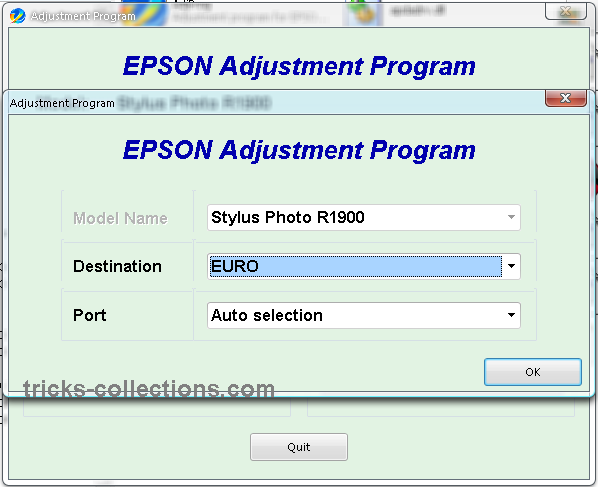
  • Set port setting and destination, or you can select auto selections -Ok. Click particular adjustment mode.
    adjustment program epson R1900 setting
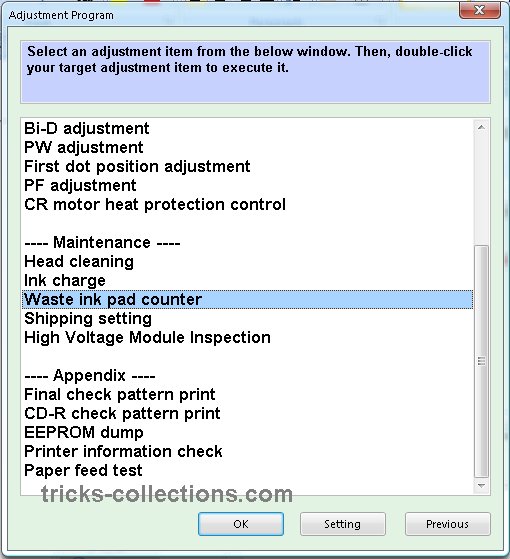
  • Select waste ink pad counter from maintenance menu.
    Adjustment Program Epson R1900 menu
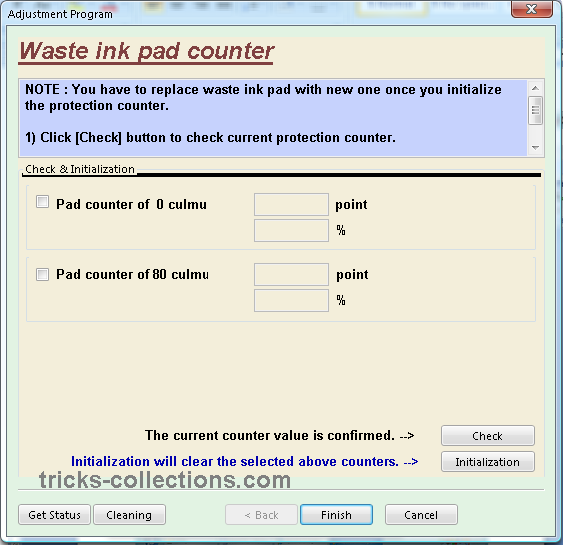
  • Click initialization button to reset the counter.
    Adjustment Epson R1900 Reset Waste Ink Counter
Download link for Adjustment Progran epson R1900 or Software resetter Epson R1900: http://rapidshare.com/files/295639096/R1900_by_OrTHoTaMiNe.rar.html
Alternate Link: http://www.mediafire.com/?hnoguiunznn

Sunday, November 24, 2013

How to Reset the protection counter of Epson TX121 and ME320 Printer


Epson TX121 and ME320 Adjustment Program

FIX PRINTER ERROR "parts inside printer end service life, waste ink pad counter overflow error"
Please follow the steps below to reset the protection counter effectively.

  1. Double click AdjProg.exe.
  2. Click “Accept” button.
  3. Click "Select" button. and select your printer model then click "OK"
  4. Click “Particular adjustment mode” button.
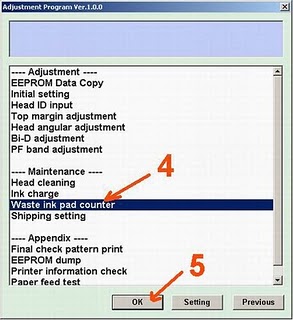
  5. Select on “Waste ink pad counter” and click “OK” button.
  6. Click on “Initialization” button and the program will reset the protection counter.
  7. Turn off the printer as a program instructed then turn on again.
  8. Click “Finish” button. and its done!
Warning: You might end up with ink leaking out of the printer if you dont either replace the waste ink pad or install external waste bin.

Thursday, November 21, 2013

Driver Download for Epson L350 INK TANK SYSTEM PRINTER


Driver Download for Epson L350 INK TANK SYSTEM PRINTER 

Epson L350


Compatibility and System Requirements : 

- Windows 8
- Windows 7
- Windows 7 (x64)
- Windows Vista
- Windows Vista (x64)
- Windows XP

Epson L350 Driver
Source direct Download link


Product name L350 Series
Language English, French, Dutch, Swedish, Czech, Danish, German, Spanish, Italian, Hungarian, Polish, Portuguese, Finnish, Turkish, Greek, Norwegian, Bulgarian, Estonian, Latvian, Lithuanian, Romanian, Russian, Arabic, Catalan, Slovak, Chinese, Kazakh, Korean, Thai, Ukrainian, Chinese (Simplified)
OS Windows XP, Windows Vista, Windows 7, Windows 8
Version Ver. 1.51(10-2012)
File name L350_x86_151UsHomeExportAsiaML_MP2.exe
File size 20.18 MB


PRINTER DRIVER DOWNLOAD HERE


Product name L210 Series, L350 Series
Language English, French, Dutch, Swedish, Czech, Danish, German, Spanish, Italian, Hungarian, Polish, Portuguese, Finnish, Turkish, Greek, Norwegian, Bulgarian, Estonian, Latvian, Lithuanian, Romanian, Russian, Arabic, Catalan, Slovak, Chinese, Korean, Ukrainian, Chinese (Simplified), Portuguese (Brazil)
OS Windows XP, Windows x64, Windows Vista, Windows Vista x64, Windows 7, Windows 7 x64, Windows 8, Windows 8 x64
Version Ver. 3.7.9.1(12-2012)
File name L210_WW_WIN_3791_41.exe
File size 19.81 MB


SCANNER DRIVER DOWNLOAD HERE

Wednesday, November 20, 2013

Solution Ink Out Error for Epson Printer

One of the problem on the Epson printer when ink level indicator is empty will show Ink Out error message when printing. This problem is usually marked with the ink led/ resume led  is light (not blinking) and when view ink level indicator the printer status on computer it show the cartridge indicator is empty and marked with X. To solve this problem, on the canon printer you can press button combination to reset the ink level but on the Epson printer you need chips resetter or on old version Epson printer you can use software resetter like SSC server or adjustment program.
In the Epson printer this problem usually appear if you use original Epson cartridges (on new Epson printer model, C79 above) and this problem cannot be reset using resetter but on old version Epson printer such as Epson C45, C67, C58, etc you can reset the cartridge using cartridge resetter.

To solve “Ink out error” problem for Epson Printer you can use one of the following methods:
  1. Change the Epson Cartirdge with compatible Epson cartridge or replace the Epson chips  with auto-reset chips.
  2. Reset Chips of cartridges using chips resetter (Chips resetter available for old Epson version only). You can buy chip resetter on computer or printer shops near you home. If you use old epson printer model you can reset the chips using SSC software but this software not support for new Epson printer models.
  3. Replace old cartridge with new cartridges, this is last solution if the both methods above not solve the problem. Before replace with new cartridge, check beforehand whether the problem is really caused by a cartridge or not because I found some ink out error is not caused by chips but cause by cartridge not installed correctly.
I hope this post can help you to solve “Ink out error” problem in your Epson printer

Tuesday, November 19, 2013

FREE Ink Reset Codes for Epson L100 L200 L800 printers

When your Epson L100, l200 or L800 printer gives the message like "Ink Out. Replace Inks" You have to buy expensive Epson ink bottles with Ink Codes on them.

But You can now use our FREE Ink Codes and refill Your printers with inks you like. Not need to pay more money for Epson Ink Bottles!


Ink Reset Codes (Reset ID) for Epson L100 and L200 4 colors printers


Black ink bottle ID:
EKA-3TF-A24-GETR
J3K-958-9J4-5DLN
GDU-T62-G5N-3GMJ
7UR-BVW-47F-MBLZ
GPC-XJQ-VT9-799R
6T2-YBZ-9WX-J42A
3BV-YV9-459-S2RC
2YB-CXS-T8D-KXDG
445 - 645 - 6UD - E7VQ
X52 - 4HD - UVR - ZYRC
YVJ - FAW - J92 - QUES
VYM - 8WZ - 5F2 - RMQ3
B3M - QUH - 5ZB - YE8Z
TW7 - 6UE - BN4 - L8MB
63C - 8CD - DDQ - 55DA
A6X - 4HV - DQ9 - X3BZ
38J - 7W3 - 7WF - AL2B
H7R - HJK - FFU - P6EM
VB5 - 3TW - TVE - 9PAP
Cyan ink bottle ID:
XXX-996-B96-BBUC
DV9-E8U-JW4-K47Z
WQ3-8ZR-M6Z-Z96F
MAY-M8D-8LZ-VUXC
VKP-V8T-87L-PGWB
LHL-K58-D3H-GV25
vbm - L3q - 4wp - v2te
Y2A - VBR - QBZ - XD3Q
H2X - 4UX - 7X9 - 4KCP
B84 - RUA - MM7 - UY85
JSL - 5PU - 5HL - QQBF
CL4 - CQB - HUG - Y53P
A92 - Y6J - YTM - 55VZ
DY5 - 744 - DTS - CR4A
J44 - 5LP - 2QL - WCWP
B94 - MK2 - UXJ - 2BGE
4ND - YSC - M3G - VGNC
Magenta ink bottle ID:
LV5-BJ8-W26-GSJS
SYH-LYR-7RR-L8EF
MWA-MUJ-W6K-YJDY
HXB-ES6-5TD-UKRP
BJ2-HB4-8QP-GKPQ
4XP-YJ7-N7Z-6X63
VKT - 3N8 - K3S - EDQR
LDR - 2EA - 6KL - 4KCP
K5X - AW3 - VDU - X8GN
FEA - 8Q8 - UZM - B7U5
FXL - LFM - XAY - LUR3
9A2 - E8J - BH9 - 8D6Z
F7B - 339 -ED2 - J4UA
X4H - PNM - 2V5 - DGNZ
22L - AML - DVU - 9RK9
72W - J3K - 4BE - L7KG
EG2 - JSH - 6HY - KBX5
Yellow ink bottle ID:
RXU-7VR-XK7-P7JZ
FX2-6XP-PGL-LTFP
K33-RG2-YRN-XACJ
QGM-5Z8-6UC-UWBQ
B5W-AZ8-F82-QADY
G4A-9VQ-A8Q-2EFZ
DN4 - 5BE - S26 - NMY5
ALQ - W9G - 92W - YDMN
PPZ - FTN - 6TL - D8EZ
QDB - L3C - 5NU - TP5G
VPT - 36F - A3E - KW7E
QGD - P7Q - PLX - CNUZ
7XG - B4Q - QFZ - XCJG
HM9 - JVZ - LQ3 -H4BA
5G3 - VR3 - HPU - 6XDZ
77X - 5CP - 527 - H4JZ
ADE - BRE - Z8S - JR6J


Ink Reset Codes (Reset ID) for Epson L800 6 color printer

Black ink bottle ID:
QJK-8M3-8SK-WE7N
TQY-9DL-2WA-98EA
L5H-8YL-MGG-2CDJ
QTX-WHE-R6L-DTBM
TUP-AB9-KPS-MZX5
32X-FDB-UUT-26UC
Cyan ink bottle ID:
64S-GB8-D68-PEPB
A7R-V-LRA-X583
QWU-ZXZ-RVP-V7HZ
8LL-JEM-CD2-957F
Light Cyan ink bottle ID:
TJT-2EQ-F9H-T97C
327-6WX-BN3-CFHS
SFL-J2G-RH2-857M
Magenta ink bottle ID:
3BJ-VEF-RV7-J8AE
F68-2JE-E6T-BQ6N
RVR-9Z4-CA7-ZUDR
NQ8-TFS-Q34-J4RC
Light Magenta ink bottle ID:
XKK-3TP-UU4-XE85
Z5Z- C5Q-Q6F-APZF
9F8-QEC-RDD-85TF
Yellow ink bottle ID:
UTV-GPF-2H3-BFW5
C9K-88G-JUQ-HGYM
FB7-Q2N-APU-XQ4E
SF8-WBQ-LH7-S5TF


If you dont want to enter reset ID codes manualy each refilling procedure - we recomend you Free Utility to reset the Inks in Epson L100, L200, L800 printers.
This WIC Reset Utility can reset inks absolutely free!
When the printer give "Ink Out" error - just run the WIC Reset utility and reset the Ink Levels in L100, L200, L800 printers to 100% again. It is easy and free. Enjoy!
Free download WIC Reset utility 4 400 kB
It has both Windows and MAC versions. Use it to reset ink level counters free!


FREE Download - Epson L100, L200, L800 Service Manuals


If you want to know about Epson L100, L200, L800 printers:
- how to repair this printers;
- how to update printers firmware;
- how to reset the waste ink pad counters;
- how to reset ink levels;
- how to disassemle printer;
- how to make adjustments

You have to read Service Manual.

We provide here Free Download links to download Service Manuals:

Free download Epson L100, L200 Service Manual
Free download Epson L800 Service Manual 

Monday, November 18, 2013

How to Reset Epson Stylus TX405 and TX408 printer

  Epson TX405 and TX408 Adjustment Program

 FIX PRINTER ERROR "parts inside printer end service life, waste ink pad counter overflow error"
Please follow the steps below to reset the protection counter effectively.


  1. Double click AdjProg2.exe.
  2. Click “Accept” button.
  3. Click "Select" button. and select your printer model then click "OK"
  4. Click “Particular adjustment mode” button.
  5. Select on “Waste ink pad counter” and click “OK” button.
  6. Click on “Initialization” button and the program will reset the protection counter.
  7. Turn off the printer as a program instructed then turn on again.
  8. Click “Finish” button. and its done!
Warning: You might end up with ink leaking out of the printer if you dont either replace the waste ink pad or install external waste bin.

Friday, November 15, 2013

Reset Epson T50 and T60 without error 21000068

Get an error 21000068 when resetting your Epson T50 or Epson T60 and not see  any solution to prevent the problem. Why not try this tips, but reset this method not recommended for beginner user and you must understand what you are doing. These tips from Jagdish Rathore (India) and I have been granted permission to publish on this blog. He also has been publishing this reset method on his blog on: http://www.epsonservice.blog.com/. If you do not have any knowledge about PCB and electronics, I recommend don’t try this reset methode.
Here the reset method from Jagdish Rathore:
  1. Turn off printer and open printer.
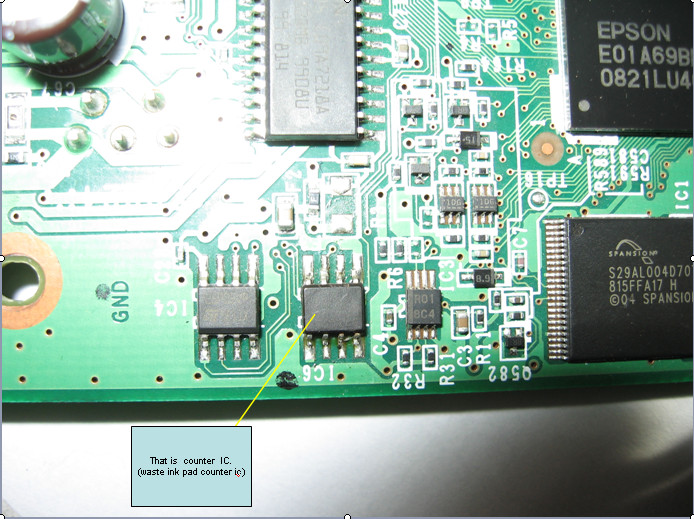
  2. Open your Epson main PCB board.  You can view an 8 pin CMOS IC.  That is Epson waste ink counter IC and found on all Epson Printer.
    step 1 T50 -T60 resetting
  3. You can reset your printer without any resetter by following these ways.
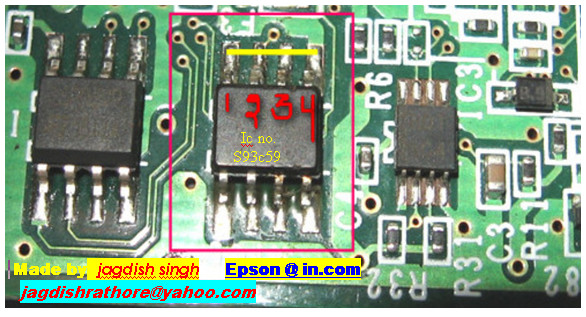
  4. Soldering pin no 1,2,3,4 by wire  as show in PICTURE and now turn on printer for ”20 second”
    step 2 T50 -T60 resetting
  5. After 20 second turn off printer  and remove soldering wire from pin no. 1,2,3,4 ( back in original condition)
  6. Now turn on your printer
  7. And now your printer will be RESET
Note: This method is not recommended for beginners so you have to understand what you are doing. All problem caused by this tutorials is not our responsibility. Use this tutorial as your own risk.

Thursday, November 14, 2013

Software program Resetter for Epson TX700 and TX 720WD


Software program Resetter for Epson TX700 and TX 720WD

FIX PRINTER ERROR "parts inside printer end service life, waste ink pad counter overflow error"


Download Software resetter for Epson TX700 (Latin version)
Download Software resetter for Epson TX700 
Download Software resetter for Epson TX720WD

Instruction Procedure to run the resetter:
Step 1:Open the zip file and run the program.

Step 2:click to Accept -> Select Model, Destination, port of your printer.

Step 3:Click “Particular adjustment mode” button.

Step 4:Select "maintainance counter" under maintainance and click ok.

NOTE : You have to replace waste ink pad with new one once you initialize
the protection counter.Otherwise ink can overflow from your printer.

Step 5: Click [Check] button to check current protection counter.

Step 6: Replace waste ink pad with new one.

Step 7: Click [Initialization] to reset current protection counter to "Zero".

Step 8:Click Finish and power off the printer.

Step 9:Power on the printer and your printer is ready to print again.

Monday, November 11, 2013

How to Reset Epson rx650 waste ink pad counter


FIX PRINTER ERROR "parts inside printer end service life, waste ink pad counter overflow error"

1. Switch on printer
2. Set the pc date setting to 13 february 2007
3. Run adjprog.exe from the extracted folder
4. Click accept
5. Click particular adjustment mode
6. Go to maintenance then Select waste ink pad counter then click ok
7. Click on "check button till its done then click on initialization button then click on finish button

8. Switch off printer for 5 secs then switch on again
9. After you reset succesfully, you can change the date back to normal

Resetter -  Download Here

Sunday, November 10, 2013

Reset for Epson T13 printer waste ink pad counter overflow error


Reset for Epson T13 printer waste ink pad counter overflow error

FIX PRINTER ERROR "parts inside printer end service life, waste ink pad counter overflow error" 

How to Reset Epson Stylus T13 :


Step 1:Be sure the driver of epson printer T13 must have been installed on your computer.
Step 2:Download Software resetter of Epson T13 first.You can download it here http://www.ziddu.com/download/12673537/T13byOrTHoTaMiNe.rar.html File Size : 398.91 KB
Note:Date of computers do not need to be changed as previously resetter.
     Turn off your Antivirus, because reseter T13 detected as virus by antivirus software.
Step 3:Run the downloaded program of Epson T13 with a double click on "AdjProg.exe".
Step 4:Follow the photo direction below(Ten Steps to do)


"Check: used to counter check the maximum 7800 points, you can see it in the main pad counter. 
If more or close to 7800 points means the printer needs to be reset " 
"Initialization: used to reset to zero counter printer "

When finished turn the printer off and then switch on again. 
The printer will flame with a full green light.That Means the printer Epson Stylus T13 that have been error is ready for use again.
enjoy.

Friday, October 25, 2013

Epson Stylus Photo R2880 printer

Epson Stylus Photo R2880 printerThis user chiral was accounting to advice you adore demography pictures with your Epson Stylus Photo R2880 printer. Apprehend this chiral thoroughly afore use, and accumulate it area all those who use the artefact will apprehend it.Table of contents Epson Stylus Photo R2880 User Guide

* Welcome
* Loading Paper
* Printing From Start to Finish
* Printing Special Photos
* Printing On CD and DVD
* Maintenance Epson Stylus Photo R2880
* Solving Problems Epson Stylus Photo R2880
* Requirements and Notices
* Index
download

Manual For EPSON EPL 5600

http://www.tonercartridgedepot.com/images/sp/epson-epl-5600.jpgThis service manual describes functions, theory of electrical and mechanical operations, maintenance, and repair of EPL-5600 /ActionLaser 1600. The instructions and procedures included herein are intended for the experience repair technician, and attention should be given to the precautions on the preceding page. The chapters are organized as follows:

CHAPTER 1. GENERAL DESCRIPTION
Provides a general product overview, lists specifications and illustrates the main components of the printer.

CHAPTER 2. OPERATING PRINCIPLES
Describes rhe theory of printer operation.

CHAPTER 3. DISASSEMBLY AND ASSEMBLY
Includes a step-by-step guide for product disassembly and assembly.

CHAPTER 4. ADJUSTMENTS
Includes a step-by-step guide for adjustment.

CHAPTER 5. TROUBLESHOOTING
Provides Epson-approved techniques for adjustment.

CHAPTER 6. MAINTENANCE
Describes preventive maintenance techniques and lists lubricants and adhesives required to service the equipment.

APPENDIX
Describes connector pin assignments circuit diagmrm circuit board component layout and exploded diagram.
download
http://rapidshare.com/files/135564446/Epson_EPL-5600_Service_Manual.rar

Epson Stylus CX7000F Product Information Guide

Epson Stylus CX7000F
Before you fax, situation your daring picture or credit on the writing array furnish. Then move your fax by manually ingress a fax signal or redialing the previous fax circumscribe. You can also set up and select an entry from your pace selector name (see the Basics Handbook for much message).

Receiving a fax

.The CX7000F Program automatically receives and prints faxes in Machine Lick modality. Nevertheless, you may requisite to get faxes manually if you linked the CX7000F Serial and a sound or responsive tool to a phone blood that also receives voice calls.Then you can invoice for a fax chant from the sending fax organization and matter a secure an the CX7000F Program to get the fax, or afford your responsive tool to conclude if the telephony is an elect fax.Scanning

You can use your CX7000F broadcast to icon a ikon or writing and book it to machine. You can still automatically regenerate washy impact photographs as you construe (see author 14 for info). The Epson Picture software provides tierce scanning modes for incremental levels of controller over your scanned appearance:

Heavy Auto Way scans quick and easily and using mechanical settings.
Domestic Modality previews your human and provides semiautomatic appearance adjustments, cropping agency, and preset options for different of scams.
Grownup Average previews your simulacrum and lets you manually configure your scan settings with a sounding wear of tools.
get