You can use this software for restore EEPRsaya Printer Canon iP6210D, iP6220D, MP150, MP170, MP450, iP2200, iP1600
Restore EEPRsaya Code for iP6210D, iP6220D, MP150, MP170, MP450
1. While pressing and holding the Power Button, plug the power into a power source. (The Power Led lights. Do not release the Poser button)
2. Push the Stop/Reset button one time while pressing and holding the Power button. Release the power button. The machine enters into the special mode.
Restore EEPRsaya Code for Canon iP2200/iP1600
1. While pressing and holding the Resume/Cancel button, plug the power cord into a power source.(Do not release the Resume/Cancel button)
2. After the power LED stays lit, press the Power button while pressing and holding the Resume/Cancel button.
3. Release the Resume/Cancel button while pressing and holding the Power button, then release the Power button. Both the Power LED and Alarm LED light
Showing posts with label reset. Show all posts
Showing posts with label reset. Show all posts
Friday, November 29, 2013

Wednesday, November 27, 2013
HP 2200 NVRAM Reset
NVRAM Reset:
1. Turn the printer power off.
2. Press and hold GO.
3. Turn the printer power back on and continue to hold GO until the Attention, Ready, and Go lights turn on.
4. Release GO.
5. The device lights will begin cycling from font to rear. The NVRAM initialization will run until completion and the device will go to the ready state.
1. Turn the printer power off.
2. Press and hold GO.
3. Turn the printer power back on and continue to hold GO until the Attention, Ready, and Go lights turn on.
4. Release GO.
5. The device lights will begin cycling from font to rear. The NVRAM initialization will run until completion and the device will go to the ready state.
Sunday, November 24, 2013
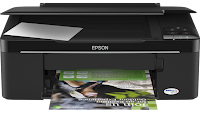
How to Reset the protection counter of Epson TX121 and ME320 Printer
.png)
Epson TX121 and ME320 Adjustment Program
FIX PRINTER ERROR "parts inside printer end service life, waste ink pad counter overflow error"
Please follow the steps below to reset the protection counter effectively.
Please follow the steps below to reset the protection counter effectively.
- Double click AdjProg.exe.
- Click “Accept” button.
- Click "Select" button. and select your printer model then click "OK"
- Click “Particular adjustment mode” button.
- Select on “Waste ink pad counter” and click “OK” button.
- Click on “Initialization” button and the program will reset the protection counter.
- Turn off the printer as a program instructed then turn on again.
- Click “Finish” button. and its done!
Warning: You might end up with ink leaking out of the printer if you dont either replace the waste ink pad or install external waste bin.
Saturday, November 23, 2013
Reset Canon IP2770 Printer with Error code 5200 without reset tool adjprog

Know How to Reset Canon IP2770 Error 5200.
first Stage:
When the iP2770 is turned on, the printer looks normal with GREEN LED glowing on. But when we give print command, then the error code 5200 on iP2770 error will appear, and the LED will blinking 8x green 1x orange.
Procedure 1:
The printer is off and plugged the power cord.
Press the RESUME button for two seconds,
then press the POWER button until the green light glows ( while pressing the POWER button, dont released RESUME button )
Then release the Resume button, but do not release the POWER button.
POWER button while still pressed, press the Resume button 5 times. Led will flash alternately orange glow green with the last orange.
(not to mistaken 4x because the printer will be totally dead, but it is temporary as well) Then Release both of the buttons simultaneously.
Led will blink briefly and then will glow GREEN.
And the computer will detect new hardware, just ignore it.
Press the POWER button, then the printer will off.
Press the POWER button again then the printer will on and PRINTER iP2770 is ready to use.
Procedure 2 on How To Reset Canon iP2770 error 5200 :
Turn the printer, and printer will look normal.
Run the printer for printing a document or a print test, then the 5200 error will appear.
Directly unplug the power cord without pressing on/off button
Open it and slide it into the middle of its cartridges manually
Unplug all cartridges and leave the lid open
Turn on the printer, head carriage will move left and right because the lid is still open and will stop in the middle.
Replace the cartridge, and close the right
The printer will return to normal.
Friday, November 22, 2013
Ink Level Reset for HP Cartidges HP21 and HP22 Tutorial Printers
Cartridges HP21 and HP22 can be found on the following printer, Hp deskjet 3920, D2400 series, D2466, D1300 series, PSC 1402, 1410 and many Hp printer again. Problem on the HP printer, if indicator ink level cartridges is empty, ...
Tuesday, November 19, 2013
FREE Ink Reset Codes for Epson L100 L200 L800 printers
When your Epson L100, l200 or L800 printer gives the message like "Ink Out. Replace Inks" You have to buy expensive Epson ink bottles with Ink Codes on them.

Black ink bottle ID:
But You can now use our FREE Ink Codes and refill Your printers with inks you like. Not need to pay more money for Epson Ink Bottles!

Ink Reset Codes (Reset ID) for Epson L100 and L200 4 colors printers
Black ink bottle ID:
EKA-3TF-A24-GETR
J3K-958-9J4-5DLN
GDU-T62-G5N-3GMJ
7UR-BVW-47F-MBLZ
GPC-XJQ-VT9-799R
6T2-YBZ-9WX-J42A
3BV-YV9-459-S2RC
2YB-CXS-T8D-KXDG
445 - 645 - 6UD - E7VQ
X52 - 4HD - UVR - ZYRC
YVJ - FAW - J92 - QUES
VYM - 8WZ - 5F2 - RMQ3
B3M - QUH - 5ZB - YE8Z
TW7 - 6UE - BN4 - L8MB
63C - 8CD - DDQ - 55DA
A6X - 4HV - DQ9 - X3BZ
38J - 7W3 - 7WF - AL2B
H7R - HJK - FFU - P6EM
VB5 - 3TW - TVE - 9PAP
J3K-958-9J4-5DLN
GDU-T62-G5N-3GMJ
7UR-BVW-47F-MBLZ
GPC-XJQ-VT9-799R
6T2-YBZ-9WX-J42A
3BV-YV9-459-S2RC
2YB-CXS-T8D-KXDG
445 - 645 - 6UD - E7VQ
X52 - 4HD - UVR - ZYRC
YVJ - FAW - J92 - QUES
VYM - 8WZ - 5F2 - RMQ3
B3M - QUH - 5ZB - YE8Z
TW7 - 6UE - BN4 - L8MB
63C - 8CD - DDQ - 55DA
A6X - 4HV - DQ9 - X3BZ
38J - 7W3 - 7WF - AL2B
H7R - HJK - FFU - P6EM
VB5 - 3TW - TVE - 9PAP
Cyan ink bottle ID:
XXX-996-B96-BBUC
DV9-E8U-JW4-K47Z
WQ3-8ZR-M6Z-Z96F
MAY-M8D-8LZ-VUXC
VKP-V8T-87L-PGWB
LHL-K58-D3H-GV25
vbm - L3q - 4wp - v2te
Y2A - VBR - QBZ - XD3Q
H2X - 4UX - 7X9 - 4KCP
B84 - RUA - MM7 - UY85
JSL - 5PU - 5HL - QQBF
CL4 - CQB - HUG - Y53P
A92 - Y6J - YTM - 55VZ
DY5 - 744 - DTS - CR4A
J44 - 5LP - 2QL - WCWP
B94 - MK2 - UXJ - 2BGE
4ND - YSC - M3G - VGNC
DV9-E8U-JW4-K47Z
WQ3-8ZR-M6Z-Z96F
MAY-M8D-8LZ-VUXC
VKP-V8T-87L-PGWB
LHL-K58-D3H-GV25
vbm - L3q - 4wp - v2te
Y2A - VBR - QBZ - XD3Q
H2X - 4UX - 7X9 - 4KCP
B84 - RUA - MM7 - UY85
JSL - 5PU - 5HL - QQBF
CL4 - CQB - HUG - Y53P
A92 - Y6J - YTM - 55VZ
DY5 - 744 - DTS - CR4A
J44 - 5LP - 2QL - WCWP
B94 - MK2 - UXJ - 2BGE
4ND - YSC - M3G - VGNC
Magenta ink bottle ID:
LV5-BJ8-W26-GSJS
SYH-LYR-7RR-L8EF
MWA-MUJ-W6K-YJDY
HXB-ES6-5TD-UKRP
BJ2-HB4-8QP-GKPQ
4XP-YJ7-N7Z-6X63
VKT - 3N8 - K3S - EDQR
LDR - 2EA - 6KL - 4KCP
K5X - AW3 - VDU - X8GN
FEA - 8Q8 - UZM - B7U5
FXL - LFM - XAY - LUR3
9A2 - E8J - BH9 - 8D6Z
F7B - 339 -ED2 - J4UA
X4H - PNM - 2V5 - DGNZ
22L - AML - DVU - 9RK9
72W - J3K - 4BE - L7KG
EG2 - JSH - 6HY - KBX5
SYH-LYR-7RR-L8EF
MWA-MUJ-W6K-YJDY
HXB-ES6-5TD-UKRP
BJ2-HB4-8QP-GKPQ
4XP-YJ7-N7Z-6X63
VKT - 3N8 - K3S - EDQR
LDR - 2EA - 6KL - 4KCP
K5X - AW3 - VDU - X8GN
FEA - 8Q8 - UZM - B7U5
FXL - LFM - XAY - LUR3
9A2 - E8J - BH9 - 8D6Z
F7B - 339 -ED2 - J4UA
X4H - PNM - 2V5 - DGNZ
22L - AML - DVU - 9RK9
72W - J3K - 4BE - L7KG
EG2 - JSH - 6HY - KBX5
Yellow ink bottle ID:
RXU-7VR-XK7-P7JZ
FX2-6XP-PGL-LTFP
K33-RG2-YRN-XACJ
QGM-5Z8-6UC-UWBQ
B5W-AZ8-F82-QADY
G4A-9VQ-A8Q-2EFZ
DN4 - 5BE - S26 - NMY5
ALQ - W9G - 92W - YDMN
PPZ - FTN - 6TL - D8EZ
QDB - L3C - 5NU - TP5G
VPT - 36F - A3E - KW7E
QGD - P7Q - PLX - CNUZ
7XG - B4Q - QFZ - XCJG
HM9 - JVZ - LQ3 -H4BA
5G3 - VR3 - HPU - 6XDZ
77X - 5CP - 527 - H4JZ
ADE - BRE - Z8S - JR6J
FX2-6XP-PGL-LTFP
K33-RG2-YRN-XACJ
QGM-5Z8-6UC-UWBQ
B5W-AZ8-F82-QADY
G4A-9VQ-A8Q-2EFZ
DN4 - 5BE - S26 - NMY5
ALQ - W9G - 92W - YDMN
PPZ - FTN - 6TL - D8EZ
QDB - L3C - 5NU - TP5G
VPT - 36F - A3E - KW7E
QGD - P7Q - PLX - CNUZ
7XG - B4Q - QFZ - XCJG
HM9 - JVZ - LQ3 -H4BA
5G3 - VR3 - HPU - 6XDZ
77X - 5CP - 527 - H4JZ
ADE - BRE - Z8S - JR6J
Ink Reset Codes (Reset ID) for Epson L800 6 color printer
Black ink bottle ID:
QJK-8M3-8SK-WE7N
TQY-9DL-2WA-98EA
L5H-8YL-MGG-2CDJ
QTX-WHE-R6L-DTBM
TUP-AB9-KPS-MZX5
32X-FDB-UUT-26UC
TQY-9DL-2WA-98EA
L5H-8YL-MGG-2CDJ
QTX-WHE-R6L-DTBM
TUP-AB9-KPS-MZX5
32X-FDB-UUT-26UC
Cyan ink bottle ID:
64S-GB8-D68-PEPB
A7R-V-LRA-X583
QWU-ZXZ-RVP-V7HZ
8LL-JEM-CD2-957F
A7R-V-LRA-X583
QWU-ZXZ-RVP-V7HZ
8LL-JEM-CD2-957F
Light Cyan ink bottle ID:
TJT-2EQ-F9H-T97C
327-6WX-BN3-CFHS
SFL-J2G-RH2-857M
327-6WX-BN3-CFHS
SFL-J2G-RH2-857M
Magenta ink bottle ID:
3BJ-VEF-RV7-J8AE
F68-2JE-E6T-BQ6N
RVR-9Z4-CA7-ZUDR
NQ8-TFS-Q34-J4RC
F68-2JE-E6T-BQ6N
RVR-9Z4-CA7-ZUDR
NQ8-TFS-Q34-J4RC
Light Magenta ink bottle ID:
XKK-3TP-UU4-XE85
Z5Z- C5Q-Q6F-APZF
9F8-QEC-RDD-85TF
Z5Z- C5Q-Q6F-APZF
9F8-QEC-RDD-85TF
Yellow ink bottle ID:
UTV-GPF-2H3-BFW5
C9K-88G-JUQ-HGYM
FB7-Q2N-APU-XQ4E
SF8-WBQ-LH7-S5TF
If you dont want to enter reset ID codes manualy each refilling procedure - we recomend you Free Utility to reset the Inks in Epson L100, L200, L800 printers.
This WIC Reset Utility can reset inks absolutely free!
When the printer give "Ink Out" error - just run the WIC Reset utility and reset the Ink Levels in L100, L200, L800 printers to 100% again. It is easy and free. Enjoy!
Free download WIC Reset utility 4 400 kB
It has both Windows and MAC versions. Use it to reset ink level counters free!
C9K-88G-JUQ-HGYM
FB7-Q2N-APU-XQ4E
SF8-WBQ-LH7-S5TF
If you dont want to enter reset ID codes manualy each refilling procedure - we recomend you Free Utility to reset the Inks in Epson L100, L200, L800 printers.
This WIC Reset Utility can reset inks absolutely free!
When the printer give "Ink Out" error - just run the WIC Reset utility and reset the Ink Levels in L100, L200, L800 printers to 100% again. It is easy and free. Enjoy!
Free download WIC Reset utility 4 400 kB
It has both Windows and MAC versions. Use it to reset ink level counters free!
FREE Download - Epson L100, L200, L800 Service Manuals |
|

Monday, November 18, 2013
How to Reset Epson Stylus TX405 and TX408 printer

Epson TX405 and TX408 Adjustment Program
FIX PRINTER ERROR "parts inside printer end service life, waste ink pad counter overflow error"
Please follow the steps below to reset the protection counter effectively.- Double click AdjProg2.exe.
- Click “Accept” button.
- Click "Select" button. and select your printer model then click "OK"
- Click “Particular adjustment mode” button.
- Select on “Waste ink pad counter” and click “OK” button.
- Click on “Initialization” button and the program will reset the protection counter.
- Turn off the printer as a program instructed then turn on again.
- Click “Finish” button. and its done!
Warning: You might end up with ink leaking out of the printer if you dont either replace the waste ink pad or install external waste bin.
Saturday, November 16, 2013
How to Reset your Wireless HP Printer After Changing a Wireless Network Name and Network Password

When you share a HP printer over your home wireless network, your wireless HP printer is tied to your network name and network password.
If youve recently changed the network name, password or both, you have to reset the printer file on your computer that allows it to be shared.
This gets it back onto the network, allowing other computer users to access it once again.
How to Reset Steps:
Click "Start." -> Click "Control Panel."-> Click the "Devices and Printers" icon. -> Right-click your wireless HP printer icon. -> Click "Properties." -> Click the "Sharing" tab -> check the "Share This Printer" box. Now Your wireless HP printer is readded to your wireless network.
Friday, November 15, 2013
Reset Epson T50 and T60 without error 21000068
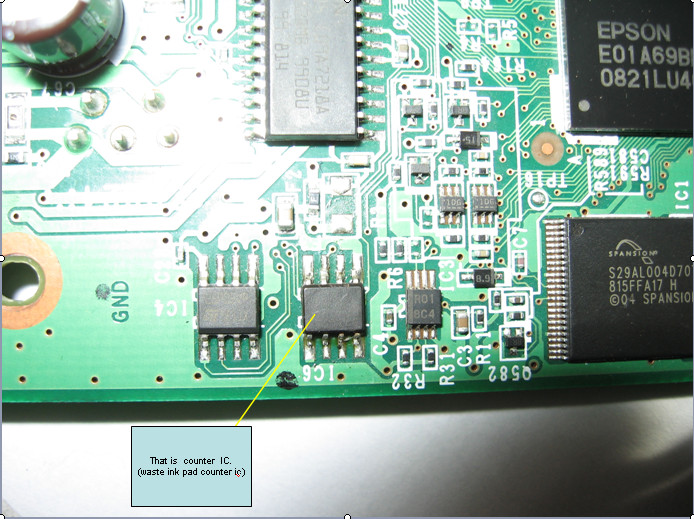
Get an error 21000068 when resetting your Epson T50 or Epson T60 and not see any solution to prevent the problem. Why not try this tips, but reset this method not recommended for beginner user and you must understand what you are doing. These tips from Jagdish Rathore (India) and I have been granted permission to publish on this blog. He also has been publishing this reset method on his blog on: http://www.epsonservice.blog.com/. If you do not have any knowledge about PCB and electronics, I recommend don’t try this reset methode.
Here the reset method from Jagdish Rathore:
Here the reset method from Jagdish Rathore:
- Turn off printer and open printer.
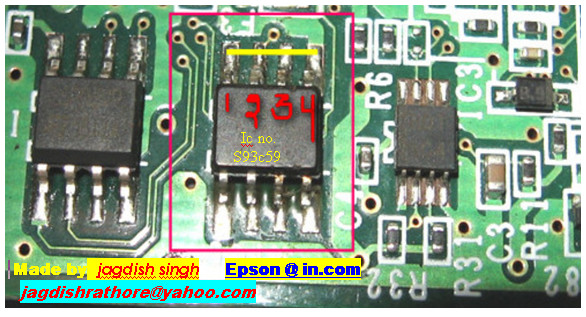
- Open your Epson main PCB board. You can view an 8 pin CMOS IC. That is Epson waste ink counter IC and found on all Epson Printer.
- You can reset your printer without any resetter by following these ways.
- Soldering pin no 1,2,3,4 by wire as show in PICTURE and now turn on printer for ”20 second”
- After 20 second turn off printer and remove soldering wire from pin no. 1,2,3,4 ( back in original condition)
- Now turn on your printer
- And now your printer will be RESET
Monday, November 11, 2013
How to Reset Epson rx650 waste ink pad counter

1. Switch on printer
2. Set the pc date setting to 13 february 2007
3. Run adjprog.exe from the extracted folder
4. Click accept
5. Click particular adjustment mode
6. Go to maintenance then Select waste ink pad counter then click ok
7. Click on "check button till its done then click on initialization button then click on finish button
8. Switch off printer for 5 secs then switch on again
9. After you reset succesfully, you can change the date back to normal
Resetter - Download Here
Sunday, November 10, 2013
Reset for Epson T13 printer waste ink pad counter overflow error

FIX PRINTER ERROR "parts inside printer end service life, waste ink pad counter overflow error"
How to Reset Epson Stylus T13 :
Step 1:Be sure the driver of epson printer T13 must have been installed on your computer.
Step 2:Download Software resetter of Epson T13 first.You can download it here http://www.ziddu.com/download/12673537/T13byOrTHoTaMiNe.rar.html File Size : 398.91 KB
Note:Date of computers do not need to be changed as previously resetter.
Turn off your Antivirus, because reseter T13 detected as virus by antivirus software.
Step 3:Run the downloaded program of Epson T13 with a double click on "AdjProg.exe".
Step 4:Follow the photo direction below(Ten Steps to do)


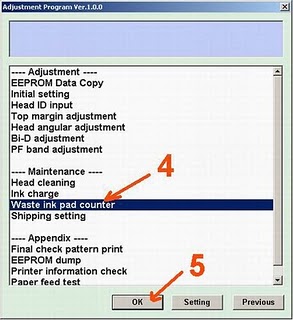

"Check: used to counter check the maximum 7800 points, you can see it in the main pad counter.
If more or close to 7800 points means the printer needs to be reset "
"Initialization: used to reset to zero counter printer "
When finished turn the printer off and then switch on again.
The printer will flame with a full green light.That Means the printer Epson Stylus T13 that have been error is ready for use again.
enjoy.
Friday, October 25, 2013
Reset Canon MP258 Ink absorber inside the printer is almost full Error P07

FIX PRINTER ERROR "parts inside printer end service life, waste ink pad counter overflow error"
If your printer show P07 error it means that your ink absorber inside the printer is almost full. In order to solve this you need to clear or reset the counter protection of your printer. To do this, follow this steps.First make sure that the power cable and usb cable are connected, before you perform the reset procedure. And download the resetter at the bottom of this post.
FIRST STEPS: Entering Service Mode
You have to enter in service mode in order to used the resetter. To do that follow this procedure,
1. Turn off the printer without pulling the power cords.
2. Hold down STOP/RESET button and press Power button.
3. Keep holding down Power button and let STOP/RESET button go.
4. Then Press STOP/RESET button twice then let BOTH buttons go.
5. You will notice that the Alternate Blinking error is gone, this means that the printer is in Service Mode state.
SECOND STEPS: Using the Resetter
1. After you download the resetter, extract it and double click "servicetool.exe"
2. Load some papers in your printer and press the "Main" Button once, wait until the printing is done.
3. Then press "EEPRsaya Clear" button to clear EEPRsaya.
4. Then press EEPRsaya button and the printer will print some text.
5. Then power off the printer(sometimes you have to press twice the power button to turn off) and turn on again. and its done!
Warning: Getting rid of the error message won’t change that you might end up with ink leaking out of the printer if you don’t either replace or clean them.
OR
3.After download is completed.You have to change a file name extension from ".doc" to ".exe"
4.Turn of the printer,wait until it stop working.
5.Press the STOP/RESET button,then press the POWER button and hold more seconds,
6.After that press the STOP/RESET button twice still press hold POWER button.
7.There after leave out from both of buttons to approach SERVICE MODE
8.Double click on the file MP258.EXE
9.It will looks like the picture,after that insert of piece of paper & press the MAIN button once,wait until printing out of paper.
10.Press an EEPRsaya CLEAR button to CLEAR EEPRsaya,after that one more paper and press an EEPRsaya button,then printer will be printed EEPRsaya to
11.When the process was completed,turn it off and turn on again.
4.Turn of the printer,wait until it stop working.
5.Press the STOP/RESET button,then press the POWER button and hold more seconds,
6.After that press the STOP/RESET button twice still press hold POWER button.
7.There after leave out from both of buttons to approach SERVICE MODE
8.Double click on the file MP258.EXE
9.It will looks like the picture,after that insert of piece of paper & press the MAIN button once,wait until printing out of paper.

10.Press an EEPRsaya CLEAR button to CLEAR EEPRsaya,after that one more paper and press an EEPRsaya button,then printer will be printed EEPRsaya to
11.When the process was completed,turn it off and turn on again.
Reset Waste Ink Counter Epson Stylus Photo RX640 Using Software Resetter
Software can be used to reset Epson Stylus Photo RX640 there is two.
You can use adjutment program for Epson Stylus Photo RX640 or using SSC
service utility, because sscserve v 4.30 support this printer.
Resetting Using Adjustment Program Epson Stylus Photo RX640
Important,
before run adjustment program for Epson Stylus Photo RX640, aler date
setting in the pc to 23 januari 2007. Date setting is needed to run
adjustment program for Epson Stylus Photo RX640 without error.


Resetting Using SSC Service Utility
Note : after resetting the printer turn off the printer and turn on again.
via scsbdblogspot.com
You can use adjutment program for Epson Stylus Photo RX640 or using SSC
service utility, because sscserve v 4.30 support this printer.
Resetting Using Adjustment Program Epson Stylus Photo RX640
Important,
before run adjustment program for Epson Stylus Photo RX640, aler date
setting in the pc to 23 januari 2007. Date setting is needed to run
adjustment program for Epson Stylus Photo RX640 without error.
- Download and run adjutment program for Epson Stylus Photo RX640 by clicking AdjProg.exe and then Select particular adjustment mode.
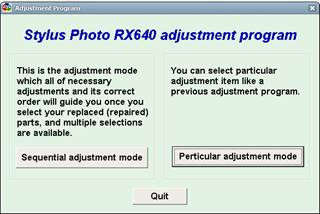
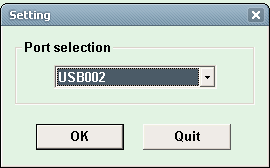
- Select usb port where printer Epson Stylus Photo RX640 installed
- Select waste ink pad counter then click Ok
- Click initialization button and the Epson Stylus Photo RX640 should be reset
Resetting Using SSC Service Utility
- Download and install SSCServe.
- Run SSC Service Utility and change the seting to rx640 and then close the windows setting.
- Right click SSC Service Utility icon in the systay to view the menu.
- Select protection counter and then select reset protection counter to reset the counter become zero.
Note : after resetting the printer turn off the printer and turn on again.
via scsbdblogspot.com
Subscribe to:
Posts (Atom)